Skip to content
A driver inspecting his machine before starting work
Maintenance & safety

The observation is caught before it becomes a breakdown

Pre-operation checklists that differ by equipment type, filled by the driver from his phone in his own language — every checklist item written in 4 languages inside the product. Results pass through review and approval before entering the record.

Before

What happens today without this module

  • 01The inspection gets signed on paper without being read
  • 02The observation is mentioned verbally, then forgotten until the breakdown happens
  • 03The driver can’t read Arabic, so he signs what he doesn’t understand
Capabilities

Exactly what this module does

  • Per-company templates with versions

    Different items by equipment class and type; an edit saves a new version and freezes the previous ones.

  • Every item in 4 languages

    Arabic, English, Urdu, and Hindi — your driver inspects in his language, not by guesswork.

  • A result per item and per inspection

    OK, observation, or not applicable per item; pass or action-required for the whole inspection, on a day or night shift.

  • Review before entry

    The inspection enters the review queue, and only the approved one is recorded in the asset’s history.

  • The template version saved with the inspection

    Each inspection carries a snapshot of its template as filled — so a later edit never changes its meaning.

Inside the service

How it actually works in your company

The paper pre-start check gets signed without being read, a driver who cannot read Arabic signs items he does not understand, and the remark he made out loud is forgotten until it becomes a breakdown that stops the machine. Here the driver opens his machine's checklist on his phone in his own language — every item is written inside the product in four languages — answers item by item with photos and notes, the inspection passes review and approval before settling into the asset record, and a failing item automatically becomes a tracked fault report.

01

Templates shaped by the machine

An excavator's checklist is not a truck's: general safety, engine and fluids are shared, then each type adds its own sections — hydraulics and tracks for tracked equipment, tires and brakes for vehicles. Templates are managed at company level in numbered versions that only the administrator edits, and every inspection stores a snapshot of its template and version at the moment it was filled — so a later template change never rewrites the meaning of an old inspection.

02

Four languages for real inspectors

Every item and every section title is written in Arabic, English, Urdu and Hindi inside the product itself, not through external translation — so the driver reads each item in his own language and answers from understanding, not guesswork. Each item takes one of three answers — sound, remark, or not applicable — and the whole inspection carries a result of pass or needs action, with a day or night shift and photos backing what was recorded.

03

Review before the permanent record

A submitted inspection does not enter the asset record directly; it waits in a review queue where the supervisor approves or rejects it, and only the approved one is written as a permanent entry in the machine's history. On approval, the cumulative meter reading is captured into the meter ledger under a monotonic guard — so the preventive-maintenance engine feeds off the most frequent reading source in daily operations without a single extra entry.

04

A remark becomes a report automatically

An inspection that ends as needing action does not stop at documentation: the system automatically creates a fault report gathering the failing items grouped under their sections in one clear description, carrying the inspection's photos, its reporter's name and its location, then follows the usual incident cycle from diagnosis to documented closure. That closes the gap where remarks used to vanish between the inspection sheet and the workshop — early detection becomes a procedure, not an intention.


Inside the product

The screen as your team uses it

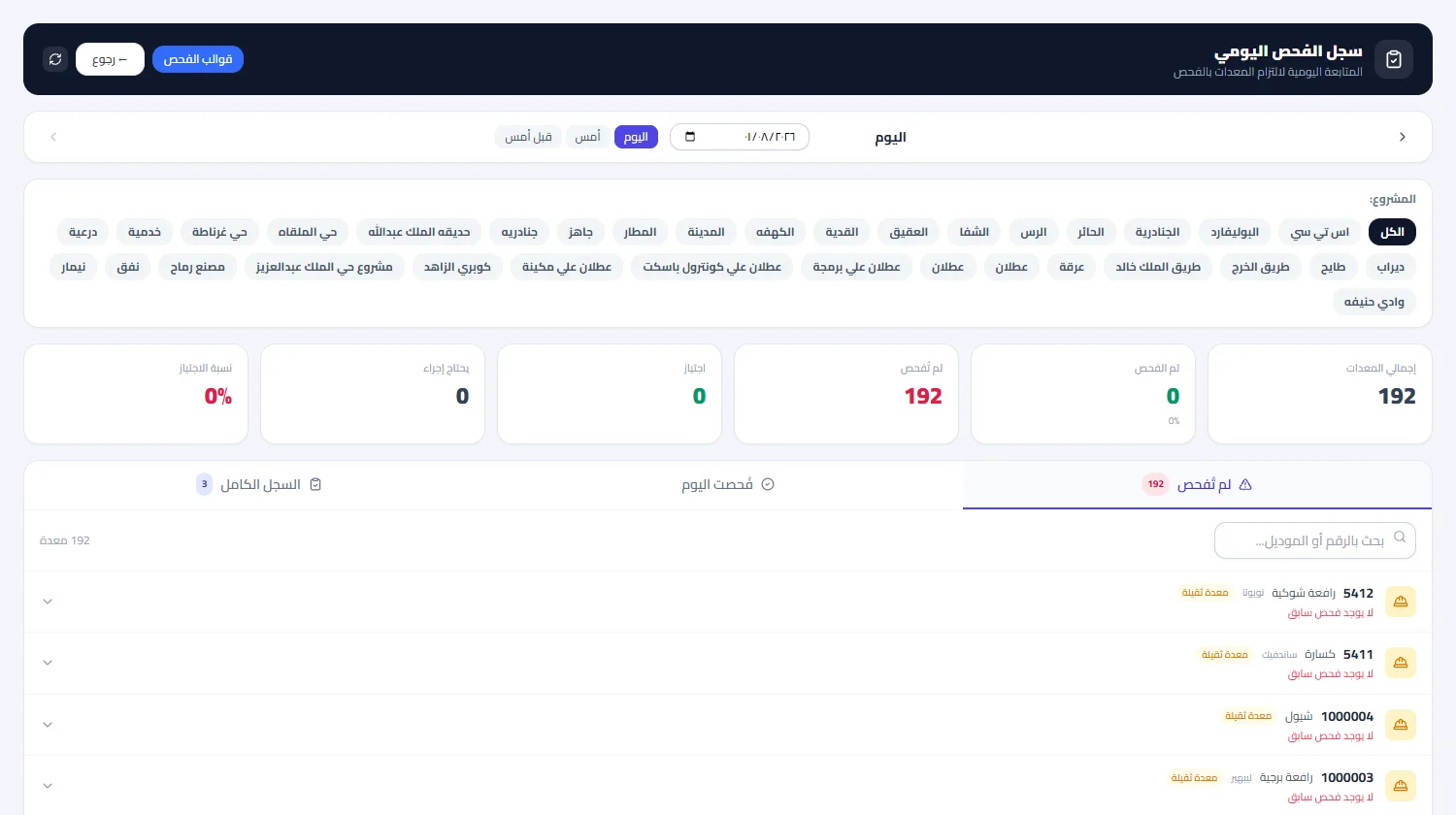
Daily Inspection
Screen of Daily Inspection
From the field, no account

One code on the asset opens all of this

The technician or driver scans the code printed on the asset and a public page opens in four languages — they submit directly, with no account and no app, and the entry lands on the asset record instantly.

  • A four-language interface, with free text auto-translated
  • A draft that never dies: saved on-device and restored even after a network drop or a closed browser
  • Duplicate-proof submission, with ID numbers shown masked
Try the asset search

What gets recorded from this page for this module

Straight from the work site

  • Daily inspection with its items and photos
The flow

How the process runs end to end

  1. 01

    Before operation

    The driver opens his machine’s checklist in his language

  2. 02

    Inspection

    Items, photos, and observations

  3. 03

    Review

    Approve or reject in the reports queue

  4. 04

    Effect

    The approved one is recorded in the asset’s history

After rollout

What actually changes

No promises built on numbers we don’t know about your company. What follows is the structural difference of wiring this module into the rest of the platform.

Early detection
before an observation becomes a fault
Documented compliance
who inspected, when, and with what result
An understood inspection
in the language of whoever actually inspects

Limits of this module

The inspection is a human declaration documented with photos, not an automated measurement of component condition.

Try Daily Inspection on your own assets — not a generic example

We tailor the demo to your operation, starting with the module that blocks your team today.